

longbridge serve
longbridge serve turns the CLI into a long-lived data source for your own application. It
authenticates and opens the market WebSocket once, then answers newline-delimited JSON-RPC 2.0
requests on stdin/stdout and pushes real-time quotes back as server notifications.
longbridge serveIt exists because the alternative is worse. Without it, a client polls by spawning
longbridge <command> --format json on a timer — and every spawn redoes region detection, token
load and WebSocket connect for a single request. The startup cost dominates, and the client is stuck
at poll-interval latency with no way to ever see a tick in between. serve pays that cost once and
keeps the connection.
Newline-delimited JSON-RPC 2.0 is the base protocol LSP, MCP and ACP all build on, so a client needs only a JSON parser and a line splitter — no protocol library, no SDK, no HTTP signing.
Quick start
Pipe requests in and read responses out:
printf '%s\n' \
  '{"jsonrpc":"2.0","id":1,"method":"quote.quote","params":{"symbols":["700.HK"]}}' \
  '{"jsonrpc":"2.0","id":2,"method":"shutdown"}' | longbridge serve
longbridge serve --help prints the protocol summary, the notification list and every method name —
it is the reference to keep open while writing a client.
Authentication is shared with the rest of the CLI, so longbridge auth login once in the same
environment is all the setup there is.
The protocol
One compact JSON object per line, UTF-8, on stdin and stdout. One request per line — batches (a JSON array) are not accepted, as in LSP and MCP.
request       {"jsonrpc":"2.0","id":1,"method":"quote.quote","params":{"symbols":["700.HK"]}}
response      {"jsonrpc":"2.0","id":1,"result":[…]}
error         {"jsonrpc":"2.0","id":1,"error":{"code":-32602,"message":"…"}}
notification  {"jsonrpc":"2.0","method":"quote.updated","params":{…}}
Four properties are worth designing your client around:
- Requests are answered concurrently, so a slow
trade.stock_positionsnever stalls the quote feed — and responses may arrive out of order. Correlate byid, as JSON-RPC intends. - Up to 8 requests run upstream at once. The rest queue, so a burst is paced rather than dropped or throttled by the server.
- The process exits when stdin closes, so it can never outlive the client that spawned it.
shutdownis the explicit form; in-flight requests get up to 5 seconds to drain either way. - Everything goes through stdout in whole lines. A single writer owns stdout, so concurrent handlers and the push feed never interleave mid-line.
Session
initialize reports the surface rather than negotiating it — a client may call any method without
calling it first, but calling it is how you discover the method list in-band instead of hard-coding
it:
→ {"jsonrpc":"2.0","id":1,"method":"initialize"}
← {"jsonrpc":"2.0","id":1,"result":{
    "protocolVersion":"1",
    "serverInfo":{"name":"longbridge","version":"0.28.0"},
    "capabilities":{"subscribe":["quote","depth","brokers","trades"]},
    "methods":["api.get","api.post","initialize","quote.brokers", …]
  }}
shutdown returns null and ends the session.
Method surface
serve sits below the CLI commands, at the API seam all of them share:
  CLI commands (AI-facing JSON, free to change)
        │
        ├── QuoteApi / TradeApi ──┐
        └── http_get / http_post ─┤
                                  ▼
serve (raw upstream payloads)| Namespace | Covers |
|---|---|
quote.* | Every quote API call — quote.quote, quote.depth, quote.candlesticks, quote.watchlist, … |
trade.* | Every trade API call — trade.stock_positions, trade.account_balance, trade.submit_order, … |
api.get / api.post | Raw passthrough to any REST endpoint. This is how the fundamentals, screener, IPO and news data is reached |
quote.subscribe / quote.unsubscribe | The live feed. No one-shot CLI equivalent |
initialize / shutdown | Session control |
Because the namespaces mirror the API traits plus a REST passthrough, serve cannot drift behind
the CLI: a new command either reuses a seam that is already exposed, or adds a trait method — and a
build-time test fails if a trait method is ever added without a matching RPC method.
Payloads are the raw OpenAPI shapes
A result is the upstream response, not the CLI’s --format json output. That distinction is
deliberate: --format json reshapes data for AI consumption and is free to change with it, while
serve is a contract for other people’s software, so it tracks the
Longbridge OpenAPI instead.
In practice:
trade.account_balancereturns SDK field names —buy_power,cash_infos,max_finance_amount.api.get /v1/quote/market-statusreturnstrade_status: 204, not a rendered label.- Decimals cross the wire as strings (
"448.600"), so a client cannot lose precision to a JSON float on the way to an order. api.get/api.postreturn the response body as received, less the account-identifying fields the CLI also strips (aaid,account_channel).
Look a method up under its own name in the API reference for its fields; quote.* and
trade.* are named after the SDK calls they forward to.
What is deliberately not a method
Views the CLI computes locally — portfolio, which merges balances, positions and FX rates — are
not exposed. A client composes them from trade.account_balance, trade.stock_positions and
quote.quote rather than depending on our arithmetic. (Or, as the Omarchy plugin below does, calls
longbridge portfolio --format json for the snapshot and keeps it repriced from the live feed.)
The live feed
quote.subscribe is the reason serve exists. Subscribe once, then live on notifications:
→ {"jsonrpc":"2.0","id":1,"method":"quote.subscribe","params":{"symbols":["700.HK"],"fields":["quote"]}}
← {"jsonrpc":"2.0","id":1,"result":{
    "subscribed":[{"symbol":"700.HK","fields":["quote"]}],
    "quotes":[{"symbol":"700.HK","last_done":"448.600","prev_close":"442.400","open":"438.200", …}]
  }}
← {"jsonrpc":"2.0","method":"quote.updated","params":{"symbol":"700.HK","last_done":"448.600","volume":12441624,"current_volume":600,"trade_session":"Intraday","timestamp":"2026-08-19T05:51:30Z", …}}
← {"jsonrpc":"2.0","method":"quote.updated","params":{"symbol":"700.HK","last_done":"448.700", …}}
fields selects what to receive — quote, depth, brokers, trades; omitted, it defaults to
["quote"]. Each field has its own notification:
| Notification | Params |
|---|---|
quote.updated | symbol, last_done, open, high, low, volume, turnover, current_volume, current_turnover, trade_status, trade_session, timestamp |
quote.depth | symbol, asks, bids |
quote.brokers | symbol, ask_brokers, bid_brokers |
quote.trades | symbol, trades |
Three things to get right:
quote.updatedis a tick, not a full quote. It carries noprev_closeand no security name — fold it onto a snapshot rather than treating it as one. Thequotesarray in thesubscriberesult is that starting snapshot; if that one call failed the field is simply omitted (the subscription is live either way) and you fall back toquote.quote.- A push can be older than the snapshot. The snapshot is taken after subscribing, so nothing is
lost, but a push may have raced ahead of it — keep whichever
timestampis newer. This is the same rule out-of-order responses need anyway. quote.unsubscribedrops every field for the named symbols, not just the ones you list. Both subscribe and unsubscribe return the fullsubscribedlist, so it is always clear what the session is actually receiving.
Nothing about the feed requires a timer. A well-built client makes a request only when something happens — the view opens, the session reconnects, the symbol set changes, or a security crosses into another trading session (the one thing a push cannot describe on its own, since it carries no previous close).
Errors
Codes follow JSON-RPC, and the split tells your client whether a retry can help:
| Code | Meaning | Retry? |
|---|---|---|
-32700 | Parse error — the line was not valid JSON | No |
-32600 | Invalid request — not a JSON-RPC 2.0 object | No |
-32601 | Unknown method — often an installed CLI older than the method you need | No; prompt for an update |
-32602 | Bad parameters — the message names the field and the offending value | No, not as-is |
-32000 | Upstream failure — Longbridge or the network | Yes, with backoff |
A parameter error names what is wrong, so it can be surfaced directly:
← {"jsonrpc":"2.0","id":4,"error":{"code":-32602,"message":"`market`: Unknown market 'MARS'. Use: HK US CN SG"}}An error never ends the session — one bad symbol must not take down a client’s live feed.
Parameter conventions
Parameters follow the OpenAPI request for the same call, with these CLI-shared spellings:
| Kind | Accepted |
|---|---|
symbol / symbols | CODE.MARKET, e.g. "700.HK"; symbols is an array |
market | HK, US, CN (SH / SZ), SG |
period | 1m, 5m, 15m, 30m, 1h, day, week, month, year |
adjust | none (default) or forward |
| Dates | YYYY-MM-DD (start, end, expiry_date) |
| Datetimes | start / end on trade.history_orders, trade.history_executions, trade.cash_flow |
| Decimals | Strings — "quantity":"100", "price":"448.6" |
query (on api.get) | An object; strings, numbers and booleans are all accepted and stringified |
Optional counts have defaults: quote.trades count is 20, quote.candlesticks count is 100.
Full method list
Call initialize for the authoritative list — this is what version 0.28.0 exposes.
Session and passthrough — initialize, shutdown, api.get, api.post
Live feed — quote.subscribe, quote.unsubscribe
quote.* — quote, depth, brokers, trades, intraday, candlesticks,
history_candlesticks_by_date, history_candlesticks_by_offset, static_info,
us_crypto_overview, calc_indexes, capital_flow, capital_distribution, market_temperature,
history_market_temperature, trading_session, trading_days, security_list, participants,
subscriptions, option_quote, option_chain_expiry_date_list, option_chain_info_by_date,
warrant_quote, warrant_list, warrant_issuers, watchlist, create_watchlist_group,
delete_watchlist_group, update_watchlist_group
trade.* — today_orders, history_orders, order_detail, today_executions,
history_executions, submit_order, cancel_order, replace_order, account_balance,
cash_flow, stock_positions, fund_positions, margin_ratio, estimate_max_purchase_quantity
A minimal client
Forty lines is enough for a working live feed:
import json, subprocess, threading, itertools

proc = subprocess.Popen(
    ["longbridge", "serve"],
    stdin=subprocess.PIPE, stdout=subprocess.PIPE, text=True, bufsize=1,
)
next_id = itertools.count(1)
pending = {}

def send(method, params=None):
    rid = next(next_id)
    req = {"jsonrpc": "2.0", "id": rid, "method": method}
    if params is not None:
        req["params"] = params
    proc.stdin.write(json.dumps(req) + "\n")
    proc.stdin.flush()
    return rid

def reader():
    for line in proc.stdout:
        msg = json.loads(line)
        if "id" in msg:                       # a response — correlate by id
            pending[msg["id"]] = msg
            if "error" in msg:
                print("error", msg["error"])
            elif msg["id"] == sub_id:
                for q in msg["result"].get("quotes", []):
                    print("snapshot", q["symbol"], q["last_done"])
        else:                                 # a notification — no id
            p = msg["params"]
            print(msg["method"], p["symbol"], p.get("last_done"))

threading.Thread(target=reader, daemon=True).start()
sub_id = send("quote.subscribe", {"symbols": ["700.HK", "AAPL.US"], "fields": ["quote"]})
input("streaming — Enter to stop\n")
send("shutdown")
The same shape works in any language: spawn the process, write one JSON object per line, read one
per line, and split responses (have an id) from notifications (do not).
Case study: Longbridge for Omarchy
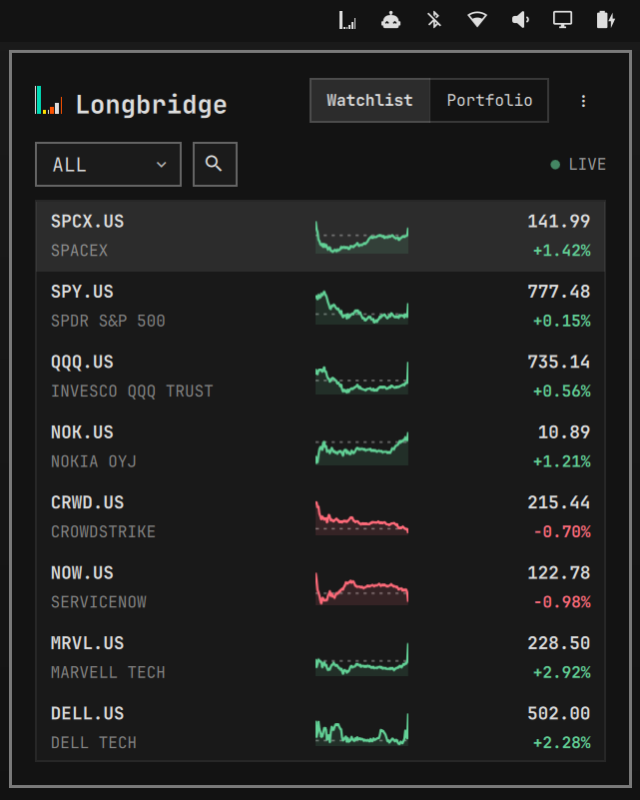
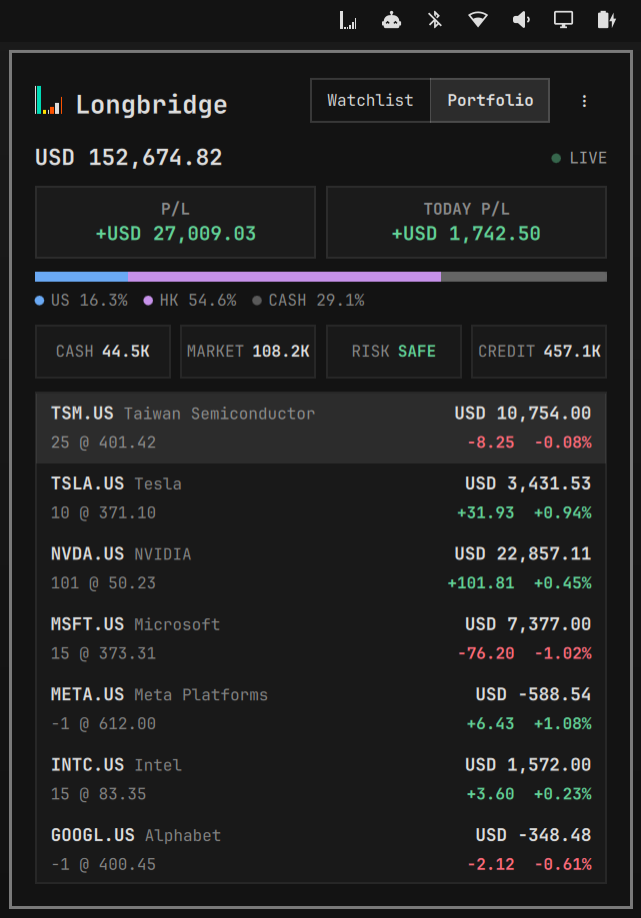
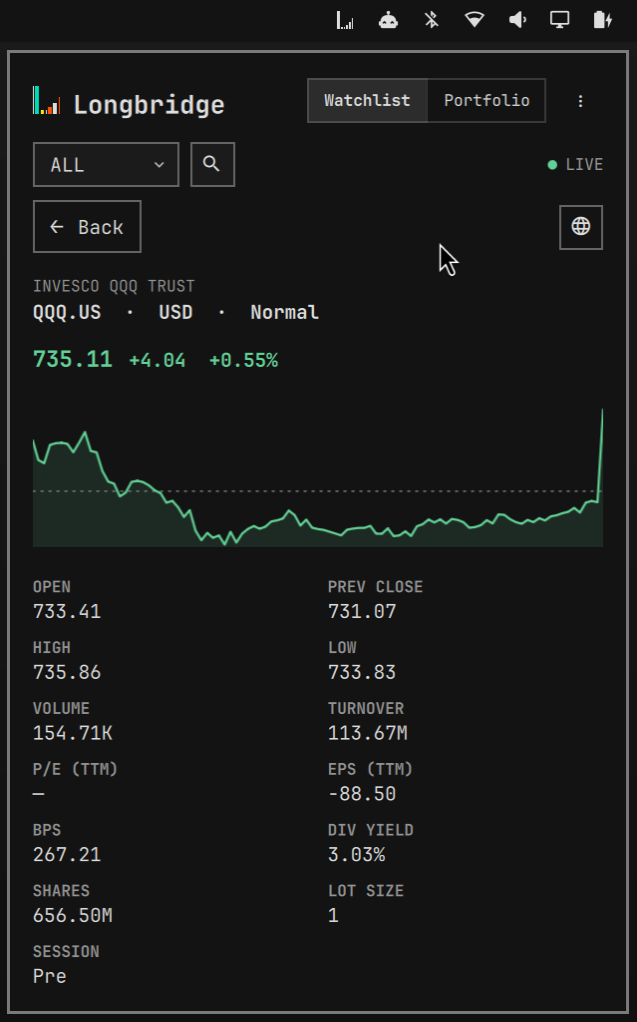
Longbridge for Omarchy is a watchlist and
portfolio panel for the Omarchy bar, written in QML — no Longbridge SDK, just
longbridge serve on a pipe. It is a good model for what a serve client looks like in practice.
| Watchlist | Portfolio | Quote detail |
|---|---|---|
 |  |  |
Install
omarchy plugin add https://github.com/longbridge/omarchy-longbridge.git --enableThen open Longbridge from the bar. The welcome page checks that Longbridge CLI is installed, links
to the installation guide if it is not, offers Log in to Longbridge, and
verifies the session with longbridge check --format json. The plugin never downloads or runs an
installer itself.
What it does with serve
- One long-lived session. While the panel is open it runs a single
longbridge serveprocess. Starting it costs about 1.5 seconds — nearly all of it process start, authentication and the WebSocket handshake — against roughly 150ms for the requests that follow. So closing the panel parks the session instead of killing it: the process and its subscriptions stay live for ten minutes, and a reopen inside that window paints immediately, with the quotes that arrived while it was closed already buffered. After ten idle minutes it is stopped — andserveexits on stdin EOF regardless, so it never outlives the shell. - Nothing polls. Groups come from
quote.watchlist, the opening prices fromquote.quotewithquote.static_infofor currency and name — a snapshot only to establish what a push cannot carry. From then on it lives onquote.subscribeand thequote.updatednotifications. There is no refresh button and no interval; a request happens only when the panel opens, the session reconnects, the selected group changes, or a symbol crosses into another trading session. - Pushes are folded, not chased. Updates are merged per symbol and applied every 500ms — a
render tick, not a fetch — so a fast-moving group repaints twenty times a minute instead of once
per notification. A
LIVEindicator sits where a refresh button would be: green while streaming,CONNECTINGorOFFLINEotherwise. - Sparklines from
quote.candlesticks. Each row draws sixty five-minute closes with a dashed rule at the previous close. A row asks for its own chart the first time it is drawn, with at most three requests in flight, so a group of hundreds only fetches what is on screen. - The
holdingsgroup is special. The watchlist API always returns it empty, because its members are the account’s own positions — so it is filled fromtrade.stock_positions, exactly as Longbridge CLI’s own TUI does. - Portfolio uses the CLI, not
serve.longbridge portfolio --format jsonsupplies the cross-currency totals and P/L thatservedeliberately does not compute; the holdings are then registered on the same quote feed, so market value and P/L move with the market between snapshots. - Last state is cached. Groups, the selected group and the most recent quote per symbol are written to disk, so a restart paints the previous rows in milliseconds and refreshes them in the background instead of showing an empty panel while the session starts.
Notes
serveneeds the samelongbridge auth loginsession as every other command, in the same environment that spawns it. Desktop applications may not inherit your shell’sPATH— use the full path to the executable iflongbridgeis not found.- A
-32601on a method you expect means the installed CLI predates it; prompt the user to runlongbridge update. - Write commands (
trade.submit_order,trade.cancel_order,trade.replace_order) are exposed and place real orders. There is no confirmation step.