---
sidebar_position: 1
slug: getting-started
title: Getting Started
---
## Foreword
Longbridge OpenAPI SDK is implemented based on Rust we have released SDK for Python, Node.js, Rust, C++/C and Java ..., and support for other languages will be launched in the future.
## API Host
- HTTP API - `https://openapi.longportapp.com`
- WebSocket Quote - `wss://openapi-quote.longportapp.com`
- WebSocket Trade - `wss://openapi-trade.longportapp.com`
:::tip
For access in mainland China, it is recommended to use `openapi.longportapp.cn`, `openapi-quote.longportapp.cn`, `openapi-trade.longportapp.cn` to improve access speed.
If you are use our SDK, the `LONGPORT_REGION=cn` env variable can to use to setup the API region (Current only support: `cn`, `hk`).
:::
## Time Format
All API response are used [Unix Timestamp](https://en.wikipedia.org/wiki/Unix_time), timezone is UTC.
## Environment Requirements
Python 3
Pip
Node.js
Yarn
Rust
JDK
Maven
Go
Go Docs
## Install SDK
```bash
pip3 install longport
```
```bash
yarn install longport
```
```toml
[dependencies]
longport = "3.0.13"
tokio = { version = "1", features = "rt-multi-thread" }
```
```xml
io.github.longportapp
openapi-sdk
LATEST
```
```shell
go get github.com/longportapp/openapi-go
```
Let's take obtaining assets as an example to demonstrate how to use the SDK.
## Configuration
1. Download App and open an account.
2. Get App Key, App Secret, Access Token and other information from [Longbridge OpenAPI](https://open.longbridge.com) official website
**_Get App Key, App Secret, Access Token and other information_**
Login the [Longbridge OpenAPI](https://open.longbridge.com) website, and enter the "User Center".
The "application credential" credential information will be given on the page. After we get it, we will set the environment variable, which is convenient for later development and use.
### Environment Variables
:::caution
Please pay attention to protect your **Access Token** information, anyone who gets it can trade your account through OpenAPI!
:::
| 环境变量 | 说明 | 值范围 |
| --------------------------- | ------------------------------------------------------------------ | --------------- |
| `LONGPORT_APP_KEY` | App Key get from developer center | |
| `LONGPORT_APP_SECRET` | App Secret get from developer center | |
| `LONGPORT_ACCESS_TOKEN` | Access Token get from developer center | |
| `LONGPORT_REGION` | The region of the API, `cn` for mainland China, `hk` for Hong Kong | `cn`, `hk` |
| `LONGPORT_ENABLE_OVERNIGHT` | Set `true` to enable overnight quote | `true`, `false` |
We recommend that you set the environment variables. For the convenience of demonstration, these environment variables will be used in the sample code in the documents in the following chapters.
:::tip About ENV
The ENV variables are **not necessary** conditions, if it is inconvenient to set the ENV variables or encounter problems that are difficult to solve, you can not set the ENV variables, but directly use the parameters in the code to initialize.
The `Config` in Longbridge OpenAPI SDK can be directly passed in parameters such as `app_key`, `app_secret`, `access_token` to initialize, pay attention to the comments in the example code below `Init config without ENV`.
:::
#### Set Environment for macOS / Linux
Open the terminal and enter the following command:
```bash
export LONGPORT_APP_KEY="App Key get from user center"
export LONGPORT_APP_SECRET="App Secret get from user center"
export LONGPORT_ACCESS_TOKEN="Access Token get from user center"
```
#### Set Environment for Windows
Windows is a little more complicated, we provide two methods to set the environment variables.
1. **Through the GUI**: Right click on "My Computer" on the desktop, select "Properties", click "Advanced system settings" in the pop-up window.
- Click "Environment Variables" in the pop-up window.
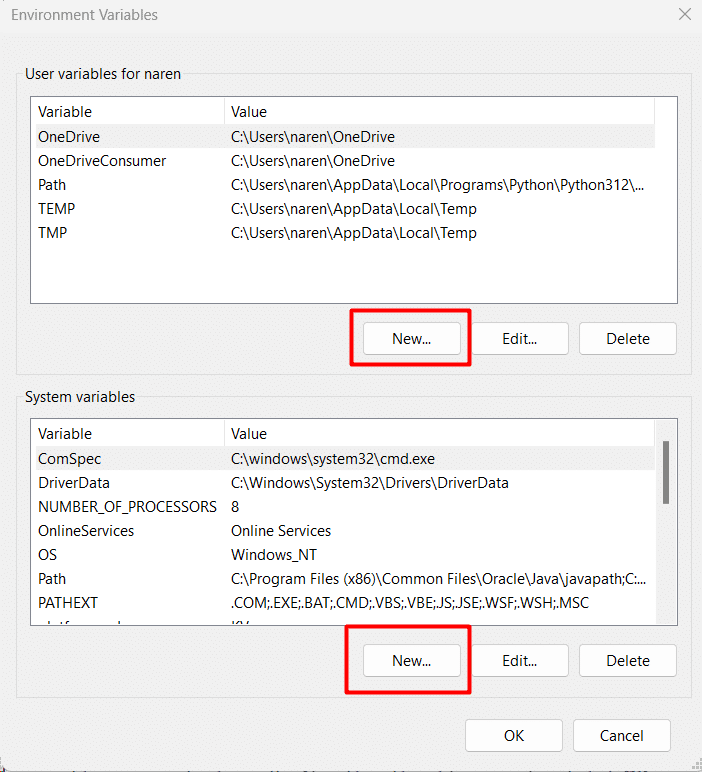 - Click "New" in the pop-up window, then enter the environment variable name, such as `LONGPORT_APP_KEY`, `Value` respectively fill in the App Key, App Secret, Access Token, Region obtained from the page.
2. **Through the CMD**: Press the `Win + R` shortcut keys and enter the `cmd` command to start the command line (it is recommended to use [Windows Terminal](https://apps.microsoft.com/store/detail/windows-terminal/9N0DX20HK701) for a better development experience).
Enter the following command in the command line to set the environment variable:
```bash
C:\Users\jason> setx LONGPORT_APP_KEY "App Key get from user center"
Success: the specified value has been saved.
C:\Users\jason> setx LONGPORT_APP_SECRET "App Secret get from user center"
Success: the specified value has been saved.
C:\Users\jason> setx LONGPORT_ACCESS_TOKEN "Access Token get from user center"
Success: the specified value has been saved.
```
:::caution Windows ENV Restrictions
Windows ENV Restrictions, when the above commands are executed successfully, you need to restart Windows or log out and log in again before you can read it.
:::
After logging out or restarting, open the command line again and enter the following command to verify that the environment variables are set correctly:
```bash
C:\Users\jason> set LONGPORT
LONGPORT_APP_KEY=xxxxxxx
LONGPORT_APP_SECRET=xxxxxx
LONGPORT_ACCESS_TOKEN=xxxxxxx
```
If it prints the value you just set correctly, then the environment variable is right.
## Scene Demonstration
### Get Account Balance
Cteate `account_asset.py` and paste the code below:
```python
from longport.openapi import TradeContext, Config
config = Config.from_env()
# Init config without ENV
# config = Config(app_key = "YOUR_APP_KEY", app_secret = "YOUR_APP_SECRET", access_token = "YOUR_ACCESS_TOKEN")
ctx = TradeContext(config)
resp = ctx.account_balance()
print(resp)
```
Run it
```bash
python account_asset.py
```
Cteate `account_asset.js` and paste the code below:
```javascript
const { Config, TradeContext } = require('longport')
let config = Config.fromEnv()
// Init config without ENV
// let config = new Config({ appKey: "YOUR_APP_KEY", appSecret: "YOUR_APP_SECRET", accessToken: "YOUR_ACCESS_TOKEN" })
TradeContext.new(config)
.then((ctx) => ctx.accountBalance())
.then((resp) => {
for (let obj of resp) {
console.log(obj.toString())
}
})
```
Run it
```bash
nodejs account_asset.js
```
Cteate `main.rs` and paste the code below:
```rust
use std::sync::Arc;
use longport::{trade::TradeContext, Config};
#[tokio::main]
async fn main() -> Result<(), Box> {
let config = Arc::new(Config::from_env()?);
// Init config without ENV
// let config = Arc::new(Config::new("YOUR_APP_KEY", "YOUR_APP_SECRET", "YOUR_ACCESS_TOKEN")?);
let (ctx, _) = TradeContext::try_new(config).await?;
let resp = ctx.account_balance().await?;
println!("{:?}", resp);
Ok(())
}
```
Run it
```bash
cargo run
```
Cteate `Main.java` and paste the code below:
```java
import com.longport.*;
import com.longport.trade.*;
class Main {
public static void main(String[] args) throws Exception {
Config config = Config.fromEnv();
// Init config without ENV
// https://longportapp.github.io/openapi/java/com/longport/ConfigBuilder.html
// Config config = ConfigBuilder("YOUR_APP_KEY", "YOUR_APP_SECRET", "YOUR_ACCESS_TOKEN").build();
try (TradeContext ctx = TradeContext.create(config).get()) {
for (AccountBalance obj : ctx.getAccountBalance().get()) {
System.out.println(obj);
}
}
}
}
```
Run it
```bash
mvn compile exec:exec
```
Create `main.go` and paste the code below:
```go
package main
import (
"context"
"fmt"
"log"
"github.com/longportapp/openapi-go/config"
"github.com/longportapp/openapi-go/trade"
)
func main() {
conf, err := config.New()
// Init config without ENV
// https://github.com/longportapp/openapi-go/blob/v0.9.2/config/config_test.go#L11
// conf, err := config.New(config.WithConfigKey("YOUR_APP_KEY", "YOUR_APP_SECRET", "YOUR_ACCESS_TOKEN"))
if err != nil {
log.Fatal(err)
}
tradeContext, err := trade.NewFromCfg(conf)
if err != nil {
log.Fatal(err)
}
defer tradeContext.Close()
ctx := context.Background()
// Get AccountBalance infomation
ab, err := tradeContext.AccountBalance(ctx)
if err != nil {
log.Fatal(err)
}
fmt.Printf("%+v", ab)
}
```
Run:
```shell
go mod tidy
go run ./
```
After running, the output is as follows:
```
[
AccountBalance {
total_cash: 503898884.81,
max_finance_amount: 0.00,
remaining_finance_amount: 501403229.49,
risk_level: Some(1),
margin_call: 0,
currency: "HKD",
cash_infos: [
CashInfo {
withdraw_cash: 501214985.15,
available_cash: 501214985.15,
frozen_cash: 584438.25,
settling_cash: -3897793.90,
currency: "HKD",
},
CashInfo {
withdraw_cash: -25546.89,
available_cash: -25546.89,
frozen_cash: 295768.57,
settling_cash: 2326.60,
currency: "USD",
}
]
}
]
```
### Subscribe Quote
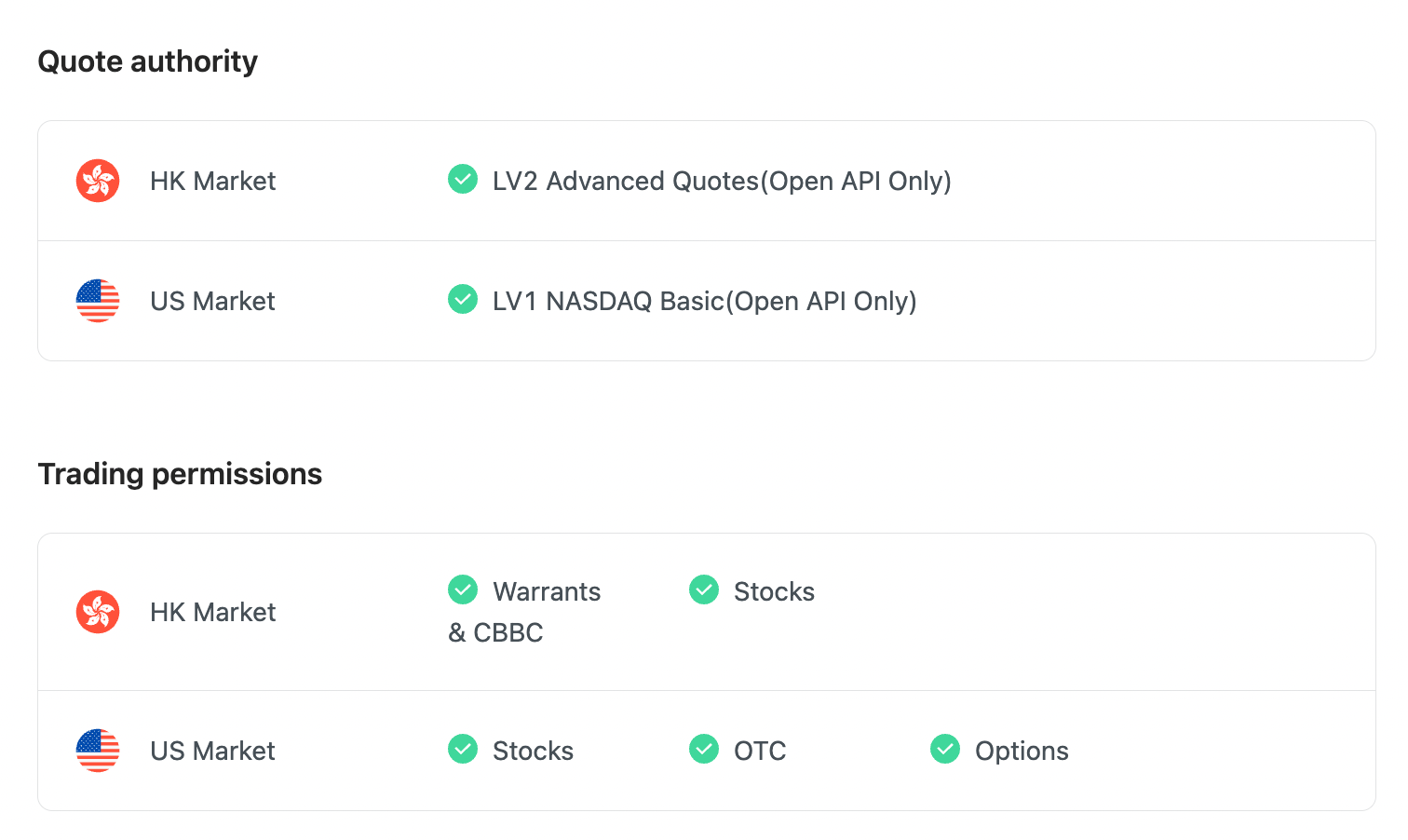
To subscribe to market data, please check the [Developer Center](https://open.longbridge.com/account) - "Quote authority" is correct
- HK Market - BMP basic quotation is unable to subscribe with WebSocket as it has no real-time quote push.
- US Market - LV1 Nasdaq Basic (Only OpenAPI).
Before running, visit the [Developer Center](https://open.longbridge.com/account) and ensure that the account has the correct quote level.
:::info
If you do not have the quotes authority, you can enter "Me - My Quotes - Store" to purchase the authority through the "Longbridge" mobile app.
https://longbridge.com/download
:::
When you have the correct Quote authority, it might look like this:
- Click "New" in the pop-up window, then enter the environment variable name, such as `LONGPORT_APP_KEY`, `Value` respectively fill in the App Key, App Secret, Access Token, Region obtained from the page.
2. **Through the CMD**: Press the `Win + R` shortcut keys and enter the `cmd` command to start the command line (it is recommended to use [Windows Terminal](https://apps.microsoft.com/store/detail/windows-terminal/9N0DX20HK701) for a better development experience).
Enter the following command in the command line to set the environment variable:
```bash
C:\Users\jason> setx LONGPORT_APP_KEY "App Key get from user center"
Success: the specified value has been saved.
C:\Users\jason> setx LONGPORT_APP_SECRET "App Secret get from user center"
Success: the specified value has been saved.
C:\Users\jason> setx LONGPORT_ACCESS_TOKEN "Access Token get from user center"
Success: the specified value has been saved.
```
:::caution Windows ENV Restrictions
Windows ENV Restrictions, when the above commands are executed successfully, you need to restart Windows or log out and log in again before you can read it.
:::
After logging out or restarting, open the command line again and enter the following command to verify that the environment variables are set correctly:
```bash
C:\Users\jason> set LONGPORT
LONGPORT_APP_KEY=xxxxxxx
LONGPORT_APP_SECRET=xxxxxx
LONGPORT_ACCESS_TOKEN=xxxxxxx
```
If it prints the value you just set correctly, then the environment variable is right.
## Scene Demonstration
### Get Account Balance
Cteate `account_asset.py` and paste the code below:
```python
from longport.openapi import TradeContext, Config
config = Config.from_env()
# Init config without ENV
# config = Config(app_key = "YOUR_APP_KEY", app_secret = "YOUR_APP_SECRET", access_token = "YOUR_ACCESS_TOKEN")
ctx = TradeContext(config)
resp = ctx.account_balance()
print(resp)
```
Run it
```bash
python account_asset.py
```
Cteate `account_asset.js` and paste the code below:
```javascript
const { Config, TradeContext } = require('longport')
let config = Config.fromEnv()
// Init config without ENV
// let config = new Config({ appKey: "YOUR_APP_KEY", appSecret: "YOUR_APP_SECRET", accessToken: "YOUR_ACCESS_TOKEN" })
TradeContext.new(config)
.then((ctx) => ctx.accountBalance())
.then((resp) => {
for (let obj of resp) {
console.log(obj.toString())
}
})
```
Run it
```bash
nodejs account_asset.js
```
Cteate `main.rs` and paste the code below:
```rust
use std::sync::Arc;
use longport::{trade::TradeContext, Config};
#[tokio::main]
async fn main() -> Result<(), Box> {
let config = Arc::new(Config::from_env()?);
// Init config without ENV
// let config = Arc::new(Config::new("YOUR_APP_KEY", "YOUR_APP_SECRET", "YOUR_ACCESS_TOKEN")?);
let (ctx, _) = TradeContext::try_new(config).await?;
let resp = ctx.account_balance().await?;
println!("{:?}", resp);
Ok(())
}
```
Run it
```bash
cargo run
```
Cteate `Main.java` and paste the code below:
```java
import com.longport.*;
import com.longport.trade.*;
class Main {
public static void main(String[] args) throws Exception {
Config config = Config.fromEnv();
// Init config without ENV
// https://longportapp.github.io/openapi/java/com/longport/ConfigBuilder.html
// Config config = ConfigBuilder("YOUR_APP_KEY", "YOUR_APP_SECRET", "YOUR_ACCESS_TOKEN").build();
try (TradeContext ctx = TradeContext.create(config).get()) {
for (AccountBalance obj : ctx.getAccountBalance().get()) {
System.out.println(obj);
}
}
}
}
```
Run it
```bash
mvn compile exec:exec
```
Create `main.go` and paste the code below:
```go
package main
import (
"context"
"fmt"
"log"
"github.com/longportapp/openapi-go/config"
"github.com/longportapp/openapi-go/trade"
)
func main() {
conf, err := config.New()
// Init config without ENV
// https://github.com/longportapp/openapi-go/blob/v0.9.2/config/config_test.go#L11
// conf, err := config.New(config.WithConfigKey("YOUR_APP_KEY", "YOUR_APP_SECRET", "YOUR_ACCESS_TOKEN"))
if err != nil {
log.Fatal(err)
}
tradeContext, err := trade.NewFromCfg(conf)
if err != nil {
log.Fatal(err)
}
defer tradeContext.Close()
ctx := context.Background()
// Get AccountBalance infomation
ab, err := tradeContext.AccountBalance(ctx)
if err != nil {
log.Fatal(err)
}
fmt.Printf("%+v", ab)
}
```
Run:
```shell
go mod tidy
go run ./
```
After running, the output is as follows:
```
[
AccountBalance {
total_cash: 503898884.81,
max_finance_amount: 0.00,
remaining_finance_amount: 501403229.49,
risk_level: Some(1),
margin_call: 0,
currency: "HKD",
cash_infos: [
CashInfo {
withdraw_cash: 501214985.15,
available_cash: 501214985.15,
frozen_cash: 584438.25,
settling_cash: -3897793.90,
currency: "HKD",
},
CashInfo {
withdraw_cash: -25546.89,
available_cash: -25546.89,
frozen_cash: 295768.57,
settling_cash: 2326.60,
currency: "USD",
}
]
}
]
```
### Subscribe Quote
To subscribe to market data, please check the [Developer Center](https://open.longbridge.com/account) - "Quote authority" is correct
- HK Market - BMP basic quotation is unable to subscribe with WebSocket as it has no real-time quote push.
- US Market - LV1 Nasdaq Basic (Only OpenAPI).
Before running, visit the [Developer Center](https://open.longbridge.com/account) and ensure that the account has the correct quote level.
:::info
If you do not have the quotes authority, you can enter "Me - My Quotes - Store" to purchase the authority through the "Longbridge" mobile app.
https://longbridge.com/download
:::
When you have the correct Quote authority, it might look like this:
 Create `subscribe_quote.py` and paste the code below:
```python
from time import sleep
from longport.openapi import QuoteContext, Config, SubType, PushQuote
def on_quote(symbol: str, quote: PushQuote):
print(symbol, quote)
config = Config.from_env()
ctx = QuoteContext(config)
ctx.set_on_quote(on_quote)
symbols = ["700.HK", "AAPL.US", "TSLA.US", "NFLX.US"]
ctx.subscribe(symbols, [SubType.Quote], True)
sleep(30)
```
Run it
```bash
python subscribe_quote.py
```
Create `subscribe_quote.js` and paste the code below:
```javascript
const { Config, QuoteContext, SubType } = require('longport')
let config = Config.fromEnv()
QuoteContext.new(config).then((ctx) => {
ctx.setOnQuote((_, event) => console.log(event.toString()))
ctx.subscribe(['700.HK', 'AAPL.US', 'TSLA.US', 'NFLX.US'], [SubType.Quote], true)
})
```
Run it
```bash
nodejs subscribe_quote.js
```
Create `main.rs` and paste the code below:
```rust
use std::sync::Arc;
use longport::{
quote::{QuoteContext, SubFlags},
Config,
};
#[tokio::main]
async fn main() -> Result<(), Box> {
let config = Arc::new(Config::from_env()?);
let (ctx, mut receiver) = QuoteContext::try_new(config).await?;
ctx.subscribe(
["700.HK", "AAPL.US", "TSLA.US", "NFLX.US"],
SubFlags::QUOTE,
true,
)
.await?;
while let Some(event) = receiver.recv().await {
println!("{:?}", event);
}
Ok(())
}
```
Run it
```bash
cargo run
```
Create `Main.java` and paste the code below:
```java
import com.longport.*;
import com.longport.quote.*;
class Main {
public static void main(String[] args) throws Exception {
try (Config config = Config.fromEnv(); QuoteContext ctx = QuoteContext.create(config).get()) {
ctx.setOnQuote((symbol, quote) -> {
System.out.printf("%s\t%s\n", symbol, quote);
});
ctx.subscribe(new String[] { "700.HK", "AAPL.US", "TSLA.US", "NFLX.US" }, SubFlags.Quote, true).get();
Thread.sleep(30000);
}
}
}
```
Run it
```bash
mvn compile exec:exec
```
Create file `main.go` and paste the code below:
```go
package main
import (
"context"
"encoding/json"
"fmt"
"log"
"os"
"os/signal"
"syscall"
"time"
"github.com/longportapp/openapi-go/config"
"github.com/longportapp/openapi-go/quote"
)
func main() {
// create quote context from environment variables
conf, err := config.New()
if err != nil {
log.Fatal(err)
}
quoteContext, err := quote.NewFromCfg(conf)
if err != nil {
log.Fatal(err)
return
}
defer quoteContext.Close()
ctx := context.Background()
quoteContext.OnQuote(func(pe *quote.PushQuote) {
bytes, _ := json.Marshal(pe)
fmt.Println(string(bytes))
})
quoteContext.OnDepth(func(d *quote.PushDepth) {
bytes, _ := json.Marshal(d)
if d.Sequence != 0 {
fmt.Print(time.UnixMicro(d.Sequence/1000).Format(time.RFC3339) + " ")
}
fmt.Println(string(bytes))
})
// Subscribe some symbols
err = quoteContext.Subscribe(ctx, []string{"700.HK", "AAPL.US", "NFLX.US"}, []quote.SubType{quote.SubTypeDepth}, true)
if err != nil {
log.Fatal(err)
return
}
quitChannel := make(chan os.Signal, 1)
signal.Notify(quitChannel, syscall.SIGINT, syscall.SIGTERM)
<-quitChannel
}
```
Run:
```shell
go run ./
```
After running, the output is as follows:
```
700.HK PushQuote {
last_done: 367.000,
open: 362.000,
high: 369.400,
low: 356.000,
timestamp: "2022-06-06T08:10:00Z",
volume: 22377421,
turnover: 8081883405.000,
trade_status: Normal,
trade_session: Normal
}
AAPL.US PushQuote {
last_done: 147.350,
open: 150.700,
high: 151.000,
low: 146.190,
timestamp: "2022-06-06T11:57:36Z",
volume: 3724407,
turnover: 550606662.815,
trade_status: Normal,
trade_session: Pre
}
NFLX.US PushQuote {
last_done: 201.250,
open: 205.990,
high: 205.990,
low: 200.110,
timestamp: "2022-06-06T11:57:26Z",
volume: 137821,
turnover: 27888085.590,
trade_status: Normal,
trade_session: Pre
}
```
### Submit Order
Next, we will do a [submit order](https://open.longbridge.com/docs/trade/order/submit) action, we assume that to buy `700.HK` at 50 HKD and quantity is `100`.
> NOTE: In order to prevent a successful test buy, the demo here gives a lower price and avoids the transaction. OpenAPI operations are equivalent to online transactions, please operate with caution, and pay attention to parameter details during development and debugging.
Create `submit_order.py` and paste the code below:
```python
from decimal import Decimal
from longport.openapi import TradeContext, Config, OrderSide, OrderType, TimeInForceType
config = Config.from_env()
ctx = TradeContext(config)
resp = ctx.submit_order(
side=OrderSide.Buy,
symbol="700.HK",
order_type=OrderType.LO,
submitted_price=Decimal(50),
submitted_quantity=Decimal(200),
time_in_force=TimeInForceType.Day,
remark="Hello from Python SDK",
)
print(resp)
```
Run it
```bash
python submit_order.py
```
Create `submit_order.js` and paste the code below:
```javascript
const { Config, TradeContext, OrderType, OrderSide, Decimal, TimeInForceType } = require('longport')
let config = Config.fromEnv()
TradeContext.new(config)
.then((ctx) =>
ctx.submitOrder({
symbol: '700.HK',
orderType: OrderType.LO,
side: OrderSide.Buy,
timeInForce: TimeInForceType.Day,
submittedQuantity: new Decimal(200),
submittedPrice: new Decimal(300),
})
)
.then((resp) => console.log(resp.toString()))
```
Run it
```bash
nodejs submit_order.js
```
Create `main.rs` and paste the code below:
```rust
use std::sync::Arc;
use longport::{
decimal,
trade::{OrderSide, OrderType, SubmitOrderOptions, TimeInForceType, TradeContext},
Config,
};
#[tokio::main]
async fn main() -> Result<(), Box> {
let config = Arc::new(Config::from_env()?);
let (ctx, _) = TradeContext::try_new(config).await?;
let opts = SubmitOrderOptions::new(
"700.HK",
OrderType::LO,
OrderSide::Buy,
decimal!(200i32),
TimeInForceType::Day,
)
.submitted_price(decimal!(50i32));
let resp = ctx.submit_order(opts).await?;
println!("{:?}", resp);
Ok(())
}
```
Run it
```bash
cargo run
```
Create `Main.java` and paste the code below:
```java
import com.longport.*;
import com.longport.trade.*;
import java.math.BigDecimal;
public class Main {
public static void main(String[] args) throws Exception {
try (Config config = Config.fromEnv(); TradeContext ctx = TradeContext.create(config).get()) {
SubmitOrderOptions opts = new SubmitOrderOptions("700.HK",
OrderType.LO,
OrderSide.Buy,
new BigDecimal(200),
TimeInForceType.Day).setSubmittedPrice(new BigDecimal(50));
SubmitOrderResponse resp = ctx.submitOrder(opts).get();
System.out.println(resp);
}
}
}
```
Run it
```bash
mvn compile exec:exec
```
创建 `main.go`,贴入一下内容:
```go
package main
import (
"context"
"fmt"
"log"
"os"
"os/signal"
"syscall"
"github.com/shopspring/decimal"
"github.com/longportapp/openapi-go/config"
"github.com/longportapp/openapi-go/trade"
)
func main() {
// create trade context from environment variables
conf, err := config.New()
if err != nil {
log.Fatal(err)
}
tradeContext, err := trade.NewFromCfg(conf)
if err != nil {
log.Fatal(err)
return
}
defer tradeContext.Close()
// subscribe order status
tradeContext.OnTrade(func(ev *trade.PushEvent) {
// handle order changing event
})
ctx := context.Background()
// submit order
order := &trade.SubmitOrder{
Symbol: "700.HK",
OrderType: trade.OrderTypeLO,
Side: trade.OrderSideBuy,
SubmittedQuantity: 200,
TimeInForce: trade.TimeTypeDay,
SubmittedPrice: decimal.NewFromFloat(12),
}
orderId, err := tradeContext.SubmitOrder(ctx, order)
if err != nil {
log.Fatal(err)
return
}
fmt.Printf("orderId: %v\n", orderId)
quitChannel := make(chan os.Signal, 1)
signal.Notify(quitChannel, syscall.SIGINT, syscall.SIGTERM)
<-quitChannel
}
```
运行:
```shell
go run ./
```
After running, the output is as follows:
```
SubmitOrderResponse { order_id: "718437534753550336" }
```
### Get Today Order
Create `today_orders.py` and paste the code below:
```python
from longport.openapi import TradeContext, Config
config = Config.from_env()
ctx = TradeContext(config)
resp = ctx.today_orders()
print(resp)
```
Run it
```bash
python today_orders.py
```
Create `today_orders.js` and paste the code below:
```javascript
const { Config, TradeContext } = require('longport')
let config = Config.fromEnv()
TradeContext.new(config)
.then((ctx) => ctx.todayOrders())
.then((resp) => {
for (let obj of resp) {
console.log(obj.toString())
}
})
```
Run it
```bash
nodejs today_orders.js
```
Create `main.rs` and paste the code below:
```rust
use std::sync::Arc;
use longport::{trade::TradeContext, Config};
#[tokio::main]
async fn main() -> Result<(), Box> {
let config = Arc::new(Config::from_env()?);
let (ctx, _) = TradeContext::try_new(config).await?;
let resp = ctx.today_orders(None).await?;
for obj in resp {
println!("{:?}", obj);
}
Ok(())
}
```
Run it
```bash
cargo run
```
Create `Main.java` and paste the code below:
```java
import com.longport.*;
import com.longport.trade.*;
class Main {
public static void main(String[] args) throws Exception {
try (Config config = Config.fromEnv(); TradeContext ctx = TradeContext.create(config).get()) {
Order[] orders = ctx.getTodayOrders(null).get();
for (Order order : orders) {
System.out.println(order);
}
}
}
}
```
Run it
```bash
mvn compile exec:exec
```
Create file `main.go` and paste the code below:
```go
package main
import (
"context"
"fmt"
"log"
"github.com/longportapp/openapi-go/config"
"github.com/longportapp/openapi-go/trade"
)
func main() {
// create trade context from environment variables
conf, err := config.New()
if err != nil {
log.Fatal(err)
}
tradeContext, err := trade.NewFromCfg(conf)
if err != nil {
log.Fatal(err)
}
defer tradeContext.Close()
ctx := context.Background()
// today orders
orders, err := tradeContext.TodayOrders(ctx, &trade.GetTodayOrders{})
if err != nil {
log.Fatal(err)
}
for _, order := range orders {
fmt.Printf("%+v\n", order)
}
}
```
Run:
```shell
go run ./
```
After running, the output is as follows:
```
Order {
order_id: "718437534753550336",
status: NotReported,
stock_name: "腾讯控股 1",
quantity: 200,
executed_quantity: None,
price: Some(50.000),
executed_price: None,
submitted_at: 2022-06-06T12:14:16Z,
side: Buy,
symbol: "700.HK",
order_type: LO,
last_done: None,
trigger_price: Some(0.000),
msg: "",
tag: Normal,
time_in_force: Day,
expire_date: Some(NaiveDate(Date { year: 2022, ordinal: 158 })),
updated_at: Some(2022-06-06T12:14:16Z),
trigger_at: None,
trailing_amount: None,
trailing_percent: None,
limit_offset: None,
trigger_status: None,
currency: "HKD",
outside_rth: nonce
}
```
The above example has fully demonstrated how to use the SDK to access the OpenAPI interface. For more interfaces, please read the [Longbridge OpenAPI Documentation](https://open.longbridge.com/docs) in detail and use them according to different interfaces.
## More Examples
We provide the complete code of the above examples in the GitHub repository of Longbridge OpenAPI Python SDK, and we will continue to add or update it later.
https://github.com/longportapp/openapi/tree/master/examples
## SDK API Document
For detailed SDK API document, please visit:
https://longportapp.github.io/openapi/
## Contact & Feedback
If there are any questions or suggestions, please feel free to post an issue on GitHub, we will reply as soon as possible.
Or there have a lot old discussion in the GitHub issue, you can search the issue to find the answer.
- GitHub: https://github.com/longportapp/openapi/issues
Create `subscribe_quote.py` and paste the code below:
```python
from time import sleep
from longport.openapi import QuoteContext, Config, SubType, PushQuote
def on_quote(symbol: str, quote: PushQuote):
print(symbol, quote)
config = Config.from_env()
ctx = QuoteContext(config)
ctx.set_on_quote(on_quote)
symbols = ["700.HK", "AAPL.US", "TSLA.US", "NFLX.US"]
ctx.subscribe(symbols, [SubType.Quote], True)
sleep(30)
```
Run it
```bash
python subscribe_quote.py
```
Create `subscribe_quote.js` and paste the code below:
```javascript
const { Config, QuoteContext, SubType } = require('longport')
let config = Config.fromEnv()
QuoteContext.new(config).then((ctx) => {
ctx.setOnQuote((_, event) => console.log(event.toString()))
ctx.subscribe(['700.HK', 'AAPL.US', 'TSLA.US', 'NFLX.US'], [SubType.Quote], true)
})
```
Run it
```bash
nodejs subscribe_quote.js
```
Create `main.rs` and paste the code below:
```rust
use std::sync::Arc;
use longport::{
quote::{QuoteContext, SubFlags},
Config,
};
#[tokio::main]
async fn main() -> Result<(), Box> {
let config = Arc::new(Config::from_env()?);
let (ctx, mut receiver) = QuoteContext::try_new(config).await?;
ctx.subscribe(
["700.HK", "AAPL.US", "TSLA.US", "NFLX.US"],
SubFlags::QUOTE,
true,
)
.await?;
while let Some(event) = receiver.recv().await {
println!("{:?}", event);
}
Ok(())
}
```
Run it
```bash
cargo run
```
Create `Main.java` and paste the code below:
```java
import com.longport.*;
import com.longport.quote.*;
class Main {
public static void main(String[] args) throws Exception {
try (Config config = Config.fromEnv(); QuoteContext ctx = QuoteContext.create(config).get()) {
ctx.setOnQuote((symbol, quote) -> {
System.out.printf("%s\t%s\n", symbol, quote);
});
ctx.subscribe(new String[] { "700.HK", "AAPL.US", "TSLA.US", "NFLX.US" }, SubFlags.Quote, true).get();
Thread.sleep(30000);
}
}
}
```
Run it
```bash
mvn compile exec:exec
```
Create file `main.go` and paste the code below:
```go
package main
import (
"context"
"encoding/json"
"fmt"
"log"
"os"
"os/signal"
"syscall"
"time"
"github.com/longportapp/openapi-go/config"
"github.com/longportapp/openapi-go/quote"
)
func main() {
// create quote context from environment variables
conf, err := config.New()
if err != nil {
log.Fatal(err)
}
quoteContext, err := quote.NewFromCfg(conf)
if err != nil {
log.Fatal(err)
return
}
defer quoteContext.Close()
ctx := context.Background()
quoteContext.OnQuote(func(pe *quote.PushQuote) {
bytes, _ := json.Marshal(pe)
fmt.Println(string(bytes))
})
quoteContext.OnDepth(func(d *quote.PushDepth) {
bytes, _ := json.Marshal(d)
if d.Sequence != 0 {
fmt.Print(time.UnixMicro(d.Sequence/1000).Format(time.RFC3339) + " ")
}
fmt.Println(string(bytes))
})
// Subscribe some symbols
err = quoteContext.Subscribe(ctx, []string{"700.HK", "AAPL.US", "NFLX.US"}, []quote.SubType{quote.SubTypeDepth}, true)
if err != nil {
log.Fatal(err)
return
}
quitChannel := make(chan os.Signal, 1)
signal.Notify(quitChannel, syscall.SIGINT, syscall.SIGTERM)
<-quitChannel
}
```
Run:
```shell
go run ./
```
After running, the output is as follows:
```
700.HK PushQuote {
last_done: 367.000,
open: 362.000,
high: 369.400,
low: 356.000,
timestamp: "2022-06-06T08:10:00Z",
volume: 22377421,
turnover: 8081883405.000,
trade_status: Normal,
trade_session: Normal
}
AAPL.US PushQuote {
last_done: 147.350,
open: 150.700,
high: 151.000,
low: 146.190,
timestamp: "2022-06-06T11:57:36Z",
volume: 3724407,
turnover: 550606662.815,
trade_status: Normal,
trade_session: Pre
}
NFLX.US PushQuote {
last_done: 201.250,
open: 205.990,
high: 205.990,
low: 200.110,
timestamp: "2022-06-06T11:57:26Z",
volume: 137821,
turnover: 27888085.590,
trade_status: Normal,
trade_session: Pre
}
```
### Submit Order
Next, we will do a [submit order](https://open.longbridge.com/docs/trade/order/submit) action, we assume that to buy `700.HK` at 50 HKD and quantity is `100`.
> NOTE: In order to prevent a successful test buy, the demo here gives a lower price and avoids the transaction. OpenAPI operations are equivalent to online transactions, please operate with caution, and pay attention to parameter details during development and debugging.
Create `submit_order.py` and paste the code below:
```python
from decimal import Decimal
from longport.openapi import TradeContext, Config, OrderSide, OrderType, TimeInForceType
config = Config.from_env()
ctx = TradeContext(config)
resp = ctx.submit_order(
side=OrderSide.Buy,
symbol="700.HK",
order_type=OrderType.LO,
submitted_price=Decimal(50),
submitted_quantity=Decimal(200),
time_in_force=TimeInForceType.Day,
remark="Hello from Python SDK",
)
print(resp)
```
Run it
```bash
python submit_order.py
```
Create `submit_order.js` and paste the code below:
```javascript
const { Config, TradeContext, OrderType, OrderSide, Decimal, TimeInForceType } = require('longport')
let config = Config.fromEnv()
TradeContext.new(config)
.then((ctx) =>
ctx.submitOrder({
symbol: '700.HK',
orderType: OrderType.LO,
side: OrderSide.Buy,
timeInForce: TimeInForceType.Day,
submittedQuantity: new Decimal(200),
submittedPrice: new Decimal(300),
})
)
.then((resp) => console.log(resp.toString()))
```
Run it
```bash
nodejs submit_order.js
```
Create `main.rs` and paste the code below:
```rust
use std::sync::Arc;
use longport::{
decimal,
trade::{OrderSide, OrderType, SubmitOrderOptions, TimeInForceType, TradeContext},
Config,
};
#[tokio::main]
async fn main() -> Result<(), Box> {
let config = Arc::new(Config::from_env()?);
let (ctx, _) = TradeContext::try_new(config).await?;
let opts = SubmitOrderOptions::new(
"700.HK",
OrderType::LO,
OrderSide::Buy,
decimal!(200i32),
TimeInForceType::Day,
)
.submitted_price(decimal!(50i32));
let resp = ctx.submit_order(opts).await?;
println!("{:?}", resp);
Ok(())
}
```
Run it
```bash
cargo run
```
Create `Main.java` and paste the code below:
```java
import com.longport.*;
import com.longport.trade.*;
import java.math.BigDecimal;
public class Main {
public static void main(String[] args) throws Exception {
try (Config config = Config.fromEnv(); TradeContext ctx = TradeContext.create(config).get()) {
SubmitOrderOptions opts = new SubmitOrderOptions("700.HK",
OrderType.LO,
OrderSide.Buy,
new BigDecimal(200),
TimeInForceType.Day).setSubmittedPrice(new BigDecimal(50));
SubmitOrderResponse resp = ctx.submitOrder(opts).get();
System.out.println(resp);
}
}
}
```
Run it
```bash
mvn compile exec:exec
```
创建 `main.go`,贴入一下内容:
```go
package main
import (
"context"
"fmt"
"log"
"os"
"os/signal"
"syscall"
"github.com/shopspring/decimal"
"github.com/longportapp/openapi-go/config"
"github.com/longportapp/openapi-go/trade"
)
func main() {
// create trade context from environment variables
conf, err := config.New()
if err != nil {
log.Fatal(err)
}
tradeContext, err := trade.NewFromCfg(conf)
if err != nil {
log.Fatal(err)
return
}
defer tradeContext.Close()
// subscribe order status
tradeContext.OnTrade(func(ev *trade.PushEvent) {
// handle order changing event
})
ctx := context.Background()
// submit order
order := &trade.SubmitOrder{
Symbol: "700.HK",
OrderType: trade.OrderTypeLO,
Side: trade.OrderSideBuy,
SubmittedQuantity: 200,
TimeInForce: trade.TimeTypeDay,
SubmittedPrice: decimal.NewFromFloat(12),
}
orderId, err := tradeContext.SubmitOrder(ctx, order)
if err != nil {
log.Fatal(err)
return
}
fmt.Printf("orderId: %v\n", orderId)
quitChannel := make(chan os.Signal, 1)
signal.Notify(quitChannel, syscall.SIGINT, syscall.SIGTERM)
<-quitChannel
}
```
运行:
```shell
go run ./
```
After running, the output is as follows:
```
SubmitOrderResponse { order_id: "718437534753550336" }
```
### Get Today Order
Create `today_orders.py` and paste the code below:
```python
from longport.openapi import TradeContext, Config
config = Config.from_env()
ctx = TradeContext(config)
resp = ctx.today_orders()
print(resp)
```
Run it
```bash
python today_orders.py
```
Create `today_orders.js` and paste the code below:
```javascript
const { Config, TradeContext } = require('longport')
let config = Config.fromEnv()
TradeContext.new(config)
.then((ctx) => ctx.todayOrders())
.then((resp) => {
for (let obj of resp) {
console.log(obj.toString())
}
})
```
Run it
```bash
nodejs today_orders.js
```
Create `main.rs` and paste the code below:
```rust
use std::sync::Arc;
use longport::{trade::TradeContext, Config};
#[tokio::main]
async fn main() -> Result<(), Box> {
let config = Arc::new(Config::from_env()?);
let (ctx, _) = TradeContext::try_new(config).await?;
let resp = ctx.today_orders(None).await?;
for obj in resp {
println!("{:?}", obj);
}
Ok(())
}
```
Run it
```bash
cargo run
```
Create `Main.java` and paste the code below:
```java
import com.longport.*;
import com.longport.trade.*;
class Main {
public static void main(String[] args) throws Exception {
try (Config config = Config.fromEnv(); TradeContext ctx = TradeContext.create(config).get()) {
Order[] orders = ctx.getTodayOrders(null).get();
for (Order order : orders) {
System.out.println(order);
}
}
}
}
```
Run it
```bash
mvn compile exec:exec
```
Create file `main.go` and paste the code below:
```go
package main
import (
"context"
"fmt"
"log"
"github.com/longportapp/openapi-go/config"
"github.com/longportapp/openapi-go/trade"
)
func main() {
// create trade context from environment variables
conf, err := config.New()
if err != nil {
log.Fatal(err)
}
tradeContext, err := trade.NewFromCfg(conf)
if err != nil {
log.Fatal(err)
}
defer tradeContext.Close()
ctx := context.Background()
// today orders
orders, err := tradeContext.TodayOrders(ctx, &trade.GetTodayOrders{})
if err != nil {
log.Fatal(err)
}
for _, order := range orders {
fmt.Printf("%+v\n", order)
}
}
```
Run:
```shell
go run ./
```
After running, the output is as follows:
```
Order {
order_id: "718437534753550336",
status: NotReported,
stock_name: "腾讯控股 1",
quantity: 200,
executed_quantity: None,
price: Some(50.000),
executed_price: None,
submitted_at: 2022-06-06T12:14:16Z,
side: Buy,
symbol: "700.HK",
order_type: LO,
last_done: None,
trigger_price: Some(0.000),
msg: "",
tag: Normal,
time_in_force: Day,
expire_date: Some(NaiveDate(Date { year: 2022, ordinal: 158 })),
updated_at: Some(2022-06-06T12:14:16Z),
trigger_at: None,
trailing_amount: None,
trailing_percent: None,
limit_offset: None,
trigger_status: None,
currency: "HKD",
outside_rth: nonce
}
```
The above example has fully demonstrated how to use the SDK to access the OpenAPI interface. For more interfaces, please read the [Longbridge OpenAPI Documentation](https://open.longbridge.com/docs) in detail and use them according to different interfaces.
## More Examples
We provide the complete code of the above examples in the GitHub repository of Longbridge OpenAPI Python SDK, and we will continue to add or update it later.
https://github.com/longportapp/openapi/tree/master/examples
## SDK API Document
For detailed SDK API document, please visit:
https://longportapp.github.io/openapi/
## Contact & Feedback
If there are any questions or suggestions, please feel free to post an issue on GitHub, we will reply as soon as possible.
Or there have a lot old discussion in the GitHub issue, you can search the issue to find the answer.
- GitHub: https://github.com/longportapp/openapi/issues